This topic includes:
▪Restoring The Default Settings
SCE Starfield mainly simulates a field of stars streaming towards the viewer from the center. This creates a depth effect.
|
|
 Default Settings |
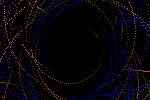 Customized Example |
▪This MADRIX Effects supports Effect Options for advanced workflows.
Learn more »Effect Options
▪Various buttons and controls have universal functions. They are available for each MADRIX 5 Effect / Layer.
Learn more »Effect Areas [Deck A / Deck B]
Learn more »Layers
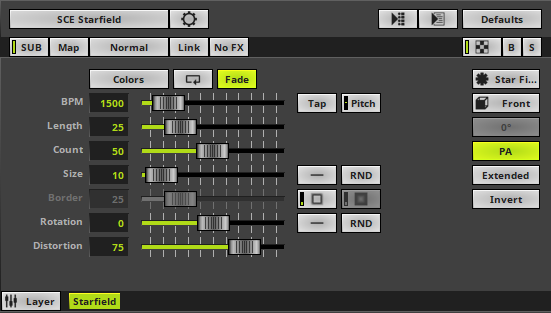
This MADRIX 5 Effect uses the following, individual controls:
▪Color - Defines the color. The default color is White.
Learn more »[Global] Colors And Intensity
▪BPM - Defines the speed. The default value is 1500. Valid values range from 0 to 9999.
Learn more »Using BPM Control
▪Length - Defines the length of objects' trace. The default value is 25. Valid values range from 1 to 1000.
▪Count - Defines the number of displayed objects. The default value is 50. Valid values range from 1 to 1000.
▪Size - Defines the size of objects [in % of the Matrix Size]. The default value is 10. Valid values range from 0.01 to 1000.
▪Border - Is only available for 2D outlined shapes or 3D unfilled shapes. Defines how thick the outer line [border] of objects is. The default value is 25. Valid values range from 1 to 100.
▪Rotation - Defines if the objects rotate around the center [in °]. The default value is 0. Valid values range from -3600 to 3600.
▪Distortion - Defines the distortion towards the center creating the depth effect [in %]. The default value is 75. Valid values range from 1 to 100.
|
Distribution - Allows you to choose a certain Distribution Mode for the specific parameter. Often, you can then define a minimum value and a maximum value. Uniform - Each object has the same size. RND - Generates random object sizes each time. This automatically activates Random Distribution Mode. |
|
Outer Glow / Inner Glow - Is only available for specific Shapes. Defines the outer shimmer or inner gleam of objects. The default settings are 25. Valid values range from 0.01 to 100. |
|
Shape - Allows you to choose a specific shape for objects. A certain Size is required before a shape becomes visible. The default setting is Star. |
|
Look-At Type - Allows you to choose from which side you want to look at the effect. This is mainly relevant for 3D. The default setting is Front. Learn more »Using Directions |
|
Shape Rotation Type - Is only available for specific Shapes. Defines the angle in which objects are rotated [0°, 90°, 180°, 270°, Random]. |
|
Path Alignment - Lets shapes rotate along the path instead of the general direction. |
|
Rendering Mode - Defines how objects are rendered. Each mode may enable additional settings [such as additional Shapes]. Choose from 2 different modes. The default setting is Extended. Simple - Prioritizes processing speed over rendering possibilities. Extended - Prioritizes rendering possibilities over over processing speed. This mode may require more performance. |
|
Invert - Inverts the direction of the effect [from outwards to inwards/from near to far]. |


Restoring The Default Settings
|
Restore Default Layer Settings - Restores the default settings of the Layer. |

| MADRIX 5.7. |
| [Ctrl & +/-] = Zoom In/Out | [Ctrl & 0] = 100% |
|
Previous Next
|
|
Enable Automatic Translation | Activer La Traduction Automatique | 启用自动翻译 |