 Ports
Ports
Ports
|
<< Click To Display Table Of Contents >> You Are Here: Device Configuration > Web Panel >
|
This topic includes:
Overview
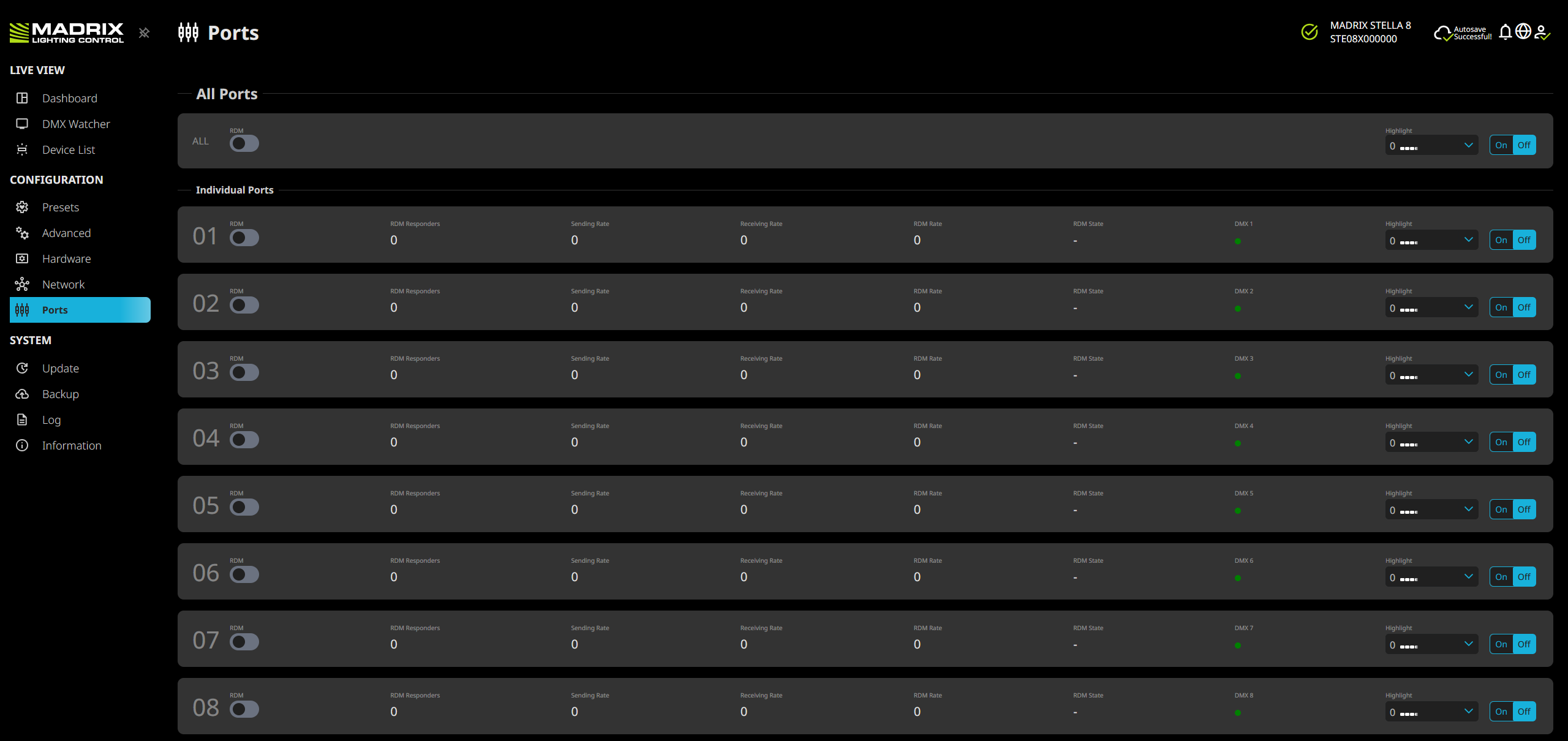
This feature refers to the physical ports DMX 1 – DMX 8 of the controller.
All Ports
RDM |
Allows you to enable or disable the RDM Controller functionality for all ports at once. |
Highlight |
Allows you to set the highlighting pattern for all ports at once, and enable or disable it accordingly. |
Individual Ports
01 – 08 |
An index number of the ports is provided for easier referencing. |
RDM |
Allows the device to receive and send Remote Device Management data on the specific port [to act as an RDM Controller]. ▪Disable RDM on the specific port, when using STELLA 8 for DMX-IN on this port [to receive DMX data]! ▪Only enable RDM if you wish to use it. Otherwise, disable RDM to avoid any potential issues. See also »Using RDM And MADRIX RADAR |
RDM Responders |
Shows the number of uniquely identified RDM devices discovered and connected to the controller. ▪This value may change continuously during an active RDM discovery process. |
Sending Rate |
Shows the current frequency with which the controller is putting data out in FPS [Frames Per Second]. ▪This value may change continuously during operation. |
Receiving Rate |
Shows the current frequency with which the controller is receiving data in FPS [Frames Per Second]. ▪This value may change continuously during operation. |
RDM Rate |
Shows the current frequency with which the controller is sending or receiving RDM data in FPS [Frames Per Second]. ▪This value may change continuously during operation. |
RDM State |
Shows the state of the RDM module, including Discovery or –. |
Dropped RDM Packets |
Shows the number of RDM packets that needed to be discarded. Reasons for the device to not be able to process packets include: ▪The device/fixture did not respond in time, ▪Too many RDM requests need to be handled by a single Port in a short amount of time, ▪RDM requests to the device 'For Internal Sensor Data And Device Status' were incorrect [such as a failed checksum]. |
DXM 1 – DMX 8 |
Shows the status LED of the specific port in the same way it is physically lit/behaving on the controller itself. |
Highlight
|
On / Off - Allows you to enable or disable channel highlighting on the specific port. Use this workflow: 1] Choose one of the built-in Patterns You can choose from the following Patterns: ▪0 ▪01 – 32 ▪33 ▪34 ▪35 ▪36 ▪37 ▪38 ▪39 ▪40 ▪41 ▪42 ▪43 ▪44 ▪45 ▪46 ▪47 ▪48 ▪49 ▪50 ▪51 ▪52 ▪53 ▪54 ▪55 ▪56 ▪57 ▪58 |
| MADRIX STELLA 8 User Manual 1.09. |
| [Ctrl & +/-] = Zoom In/Out | [Ctrl & 0] = 100% |
|
Previous Next
|
|
Enable Automatic Translation | Activer La Traduction Automatique | 启用自动翻译 |


