This topic includes:
The toolbar includes quick and direct access to commonly used features and functionality.
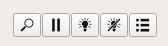
You can choose to show or hide it via menu View > Toolbar
|
Discover Devices - Re-scans for all Art-Net devices in the network [menu Devices > Discover Devices]. |
|
Pause Monitoring - Stops sending out RDM queries [menu Devices > Pause Monitoring]. |
|
Identify All Devices - Activates the identification mode for all devices that are listed in the list of devices [menu Devices > Identify All Devices (Set:IdentifyDevice)]. [It should also work for fixtures that haven't had their parameter scanned yet or may be able to listen but not be able to respond to requests.] |
|
Stop Identifying All Devices - Deactivates the identification mode for all devices that are listed in the list of devices [menu Devices > Stop Identifying All Devices (Set:IdentifyDevice)]. |
|
Patch Editor - Opens the window of the Patch Editor [menu Devices > Patch Editor...]. |


|
The toolbar is located at the top of the application window by default. |

| MADRIX RADAR User Manual 1.5. |
| [Ctrl & +/-] = Zoom In/Out | [Ctrl & 0] = 100% |
|
Previous Next
|
|
Enable Automatic Translation | Activer La Traduction Automatique | 启用自动翻译 |