This topic includes:
▪Restoring The Default Settings
SCE 3D Model allows you to load Wavefront OBJ files of the *.obj file type and let the software display them as wireframe [primarily in 3D].
Use format converters to bring your existing file formats into the *.obj file format.
The Setup/Installer includes sample files for you. Learn more »Examples
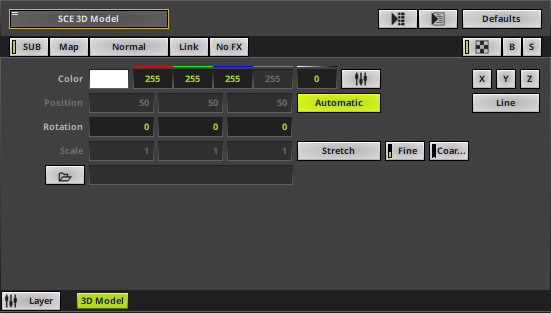 |
|
 Default Settings |
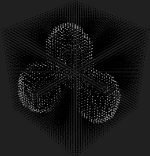 Customized Example
|
▪Various buttons and controls have universal functions. They are available for each MADRIX Effect / Layer.
Learn more »Effect Areas [Deck A / Deck B]
Learn more »Layers
This MADRIX Effect uses the following, individual controls:
▪Color - Defines the color. The default color is White.
Learn more »[Global] Colors And Intensity
▪Position - Defines the position of the object in X, Y, and Z [in % of the Matrix Size]. The default value is Automatic. Valid values range from -1000 to 1000.
▪Rotation - Defines the rotation of the object in X, Y, and Z. The default values are 0, 0, 0. Valid values range from -180 to 180.
▪Scale - Defines a scale factor that determines if the object is scaled in X, Y, and Z. The base is the values provided in the *.obj file. The default value is Stretch. Valid values range from 0 to 1000. [Values lower than 1 decrease the size, while values higher than 1 increase the size.]
 |
Open - Allows you to load a Wavefront OBJ into the software. Select the file on your computer or another source. Files are referenced from the computer/source. [You will receive an error message if the file is no longer available or cannot be accessed anymore.] Also reads the object name from the file. Can be edited. Shows the file path in the tooltip. |
 |
Axes - Defines the orientation of the object and allows you to rotate the object as needed after the import. Sideways-Axis - Choose from X, Y, Z, -X, -Y, -Z. The default setting is X. Up-Axis - Choose from X, Y, Z, -X, -Y, -Z. The default setting is Y. Forward-Axis - Choose from X, Y, Z, -X, -Y, -Z. The default setting is Z. 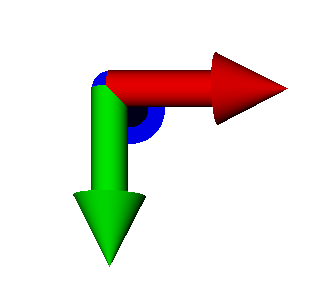 In the MADRIX 5 Software, the origin of coordinate is Front, Top, Left, which means that the X-axis points to the right [red], the Y-axis points downwards [green], and the Z-axis points to the back [blue]. |
|
Render Element - Defines which type of element from the file is rendered. [Materials, textures, and colors from the file will not be rendered.] Vertex - Renders vertices. Line - Renders lines. |
|
Automatic Positioning - Automatically positions the object in the center of the virtual LED matrix. |
|
Scale Mode - Allows you to choose from different modes on how the object is scaled compared to the virtual LED matrix. The default setting is Stretch. Custom - Unlocks Scale X/Y/Z in order to manually set any scale factors. Clip - The maximum size of the object is determined by the largest side of the virtual LED matrix. Fit - The maximum size of the object is determined by the smallest side of the virtual LED matrix. Stretch - The object is stretched in all directions to be fully shown on the virtual LED matrix with maximum extent.
Fine - Allows proportional small-scale scaling across all three scale factors, X/Y/Z. The default setting is 1.00. Valid values range from 0.00 to 2.00. Coarse - Allows proportional large-scale scaling across all three scale factors, X/Y/Z. The default setting is 1.00. Valid values range from 0.00 to 100.00. |


Restoring The Default Settings
|
Restore Default Layer Settings - Restores the default settings of the Layer. |

| MADRIX 5.8. |
| [Ctrl & +/-] = Zoom In/Out | [Ctrl & 0] = 100% |
|
Previous Next
|
|
Enable Automatic Translation | Activer La Traduction Automatique | 启用自动翻译 |