This topic includes:
The DMX Watcher provides a live view of DMX data the device is currently recording, playing back, or receiving for remote control.
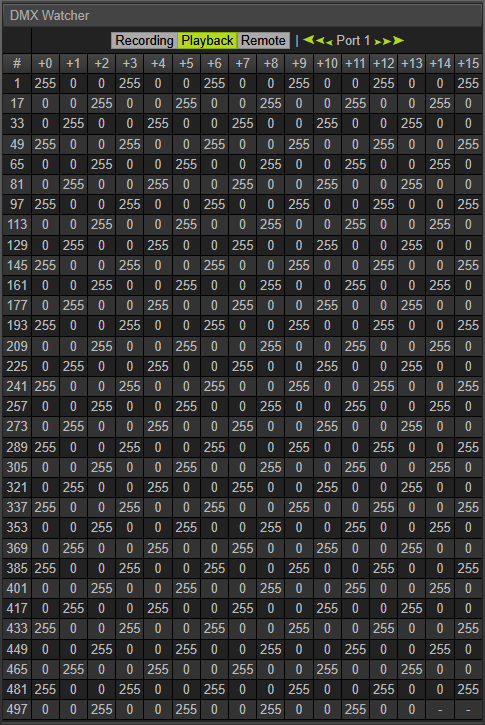
Recording |
Switches to Recording mode. ▪Only shows values in the watcher if the device is currently recording on the selected port. ▪Incoming data is shown with 2 Hz (500 ms). |
Playback |
Switches to Playback mode. ▪Only shows values in the watcher if the device is currently playing back data on the selected port. ▪Sent data is shown with 2 Hz (500 ms). |
Remote |
Switches to Recording mode. ▪Only shows values in the watcher if the device is currently receiving remote-control data on the selected port. ▪Incoming data is shown with 2 Hz (500 ms). |
Port 1 – 32 |
Selects the port of your device for which data is shown. ▪MADRIX AURA 2 offers 2 universes/ports. ▪MADRIX AURA 8 offers 8 universes/ports. ▪MADRIX AURA 12 offers 12 universes/ports. ▪MADRIX AURA 32 offers 32 universes/ports. ▪Remote Control offers 8 ports on all MADRIX AURA. |
<<<>>> |
Selects ▪The first port, ▪-4 ports [4 ports lower than the current port], ▪-1 port [1 port lower than the current port], ▪+1 port [1 port higher than the current port], ▪+4 ports [4 ports higher than the current port], ▪The last available port [2, 8, 12, or 32]. |
0 – 255 |
For each channel, the DMX Watcher shows DMX values ranging from 0 to 255. |
Channel 16 |
Hover over a value and a tooltip appears to show you which DMX channel you are watching. |
| MADRIX AURA User Manual 4.01. |
| [Ctrl & +/-] = Zoom In/Out | [Ctrl & 0] = 100% |
|
Previous Next
|
|
Enable Automatic Translation | Activer La Traduction Automatique | 启用自动翻译 |