This topic includes:
Timing options include various settings regarding the RDM timing preferences and request settings.
▪Go to the menu Preferences > Options... > Timing
[Keyboard shortcut: Ctrl + Alt + O > Timing]
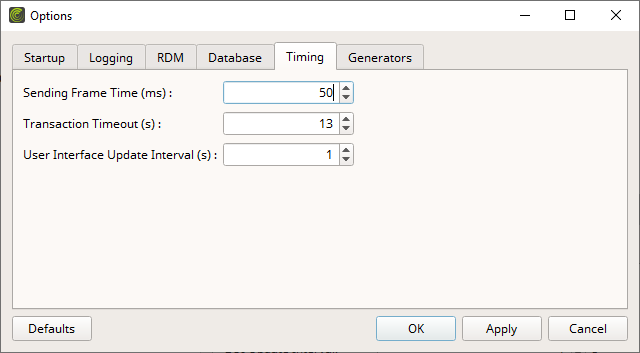
▪Set up the options as explained below.
▪Restore the default settings via Defaults.
▪Confirm any changes with OK or Apply. Discard any changes via Cancel.
▪Sending Frame Time (ms) - Defines the minimum time interval between 2 RDM data packages on a DMX line in milliseconds [ms].
- If this value is set too low, hardware interfaces may receive too many data packages, which can result in overload.
- If this value is set too high, the maximum possible data transfer rate will not be reached, which can unnecessarily increase the time required to obtain RDM information and data.
- Is mainly defined by the used hardware interfaces. As such, it is recommended to choose the lowest common denominator across all connected interfaces.
[Valid values range from 25 to 1000. This option is set to 50 ms by default.]
▪Transaction Timeout (s) - Defines the maximum allowed time interval for RDM communication and transactions in seconds [s]. Transactions include the RDM request of the controller as well as the reply/response of the responder.
- Any response that is received after this interval will be discarded and cannot be assigned to the original request anymore.
- If this value is too low, all packages could be discarded in extreme cases.
- If this value is too high, responses may be assigned incorrectly to unrelated requests.
- The timeout correlates to the RDM Frame Time and the number of RDM devices connected to a single DMX port of a hardware interface. The higher the RDM Frame Time and the more devices are connected to a single port, the longer a response can take.
[Valid values range from 1 to 30. This option is set to 13 s by default.]
▪User Interface Update Interval (s) - Defines the time interval at which the software is refreshed in seconds [s]. This refers to how often the graphical user interface [GUI] is being updated and can display new and up-to-date information.
- If this value is too low, this may result in too many database queries. This, in turn, can lead to a high number of hard-drive access operations [which can decrease a drive's lifespan due to its maximum read and write cycles].
- If this value is too high, all or parts of the information that is shown in the software may be temporarily outdated and not up to date anymore.
[Valid values range from 1 to 3600. This option is set to 1 s by default.]
▪All Timing options will be saved locally on your computer.