This topic includes:
Software options include various settings regarding computer networking.
▪Go to the menu Preferences > Options... > Network
[Keyboard shortcut: Ctrl + Alt + O > Network]
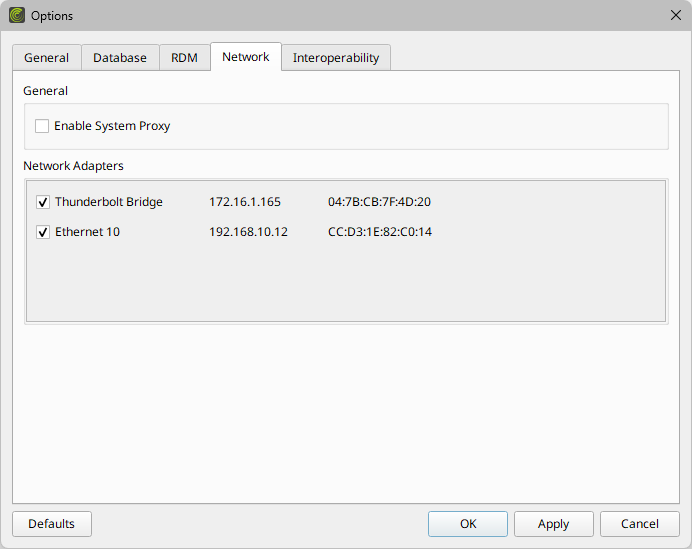
▪Set up the options as explained below.
▪Restore the default settings via Defaults.
▪Confirm any changes with OK or Apply. Discard any changes via Cancel.
General
▪Enable System Proxy - Uses the system proxy.
- A proxy is an optional intermediary for the client-server communication in a network.
- If you have set up and are using a system-wide proxy in the Windows operating system, enable this option here in order to let MADRIX RADAR route its network data through it.
- Leave this setting disabled, if you are not using a system proxy or are unsure.
[This option is set to Off by default.]
Network Adapters
This sections lists all available network adapters of your computer system [that includes physical and virtual network adapters].
By disabling a network adapter, you can exclude it from being used by the MADRIX RADAR Software and thus not have any Art-Net/RDM network communication sent or received on that line.
By default, all available network adapters are enabled.
▪R - Allows you to disable [or enable again] the listed network adapter.
▪All Startup options will be saved locally on your computer.
| MADRIX RADAR User Manual 1.5. |
| [Ctrl & +/-] = Zoom In/Out | [Ctrl & 0] = 100% |
|
Previous Next
|
|
Enable Automatic Translation | Activer La Traduction Automatique | 启用自动翻译 |